
X PhotoKit
X PhotoKitPhotography
4.31.14K Reviews
- Version
- 4.7.1
- Installs
- 50.00M
- Age Rating
- Everyone
Screenshots




Our Review of X PhotoKit
 Analysis by Appyee
Ever find yourself scrolling through your phone's gallery, wishing your photos had a little more oomph? Well, that's exactly where X PhotoKit comes into play. This app has quickly become my go-to for all things photo editing, and let me tell you, it's packed with features that make your images pop.
Features that Stand Out
The first thing you'll notice when you open X PhotoKit is its sleek and intuitive interface. It's like the app just knows what you need, without overwhelming you with a bunch of complicated tools. Whether you’re a pro photographer or just someone who likes to dabble, you'll find everything you need right here.
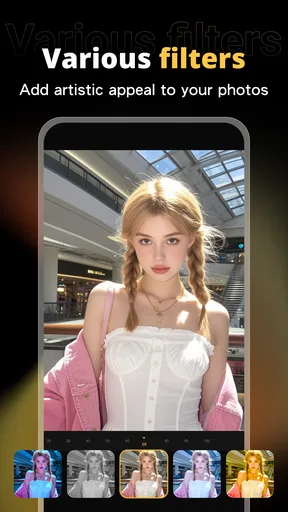
One of my favorite features is the range of filters. Now, I know what you're thinking, "Not another app with basic filters," but hear me out. These filters are next-level. They mimic professional editing techniques that can transform a simple shot into something truly spectacular. Plus, you can adjust the intensity so it’s just right.
Editing Tools Galore
Beyond filters, the app offers a comprehensive set of editing tools. From cropping and rotating to adjusting brightness, contrast, and saturation, X PhotoKit has got you covered. The best part? It’s all super user-friendly.
For those looking to dive deeper, there’s a bunch of advanced tools too. Ever wanted to play around with curves or split toning? This app has it all. And let me tell you, once you get the hang of these features, your photos will never look the same again.
Fun with Effects and Stickers
If you're into adding a bit of flair to your photos, you're in for a treat. X PhotoKit offers a wide array of effects and stickers that are just plain fun. Whether you're looking to add some text, a funky border, or a whimsical sticker, you’ve got tons of options at your fingertips.
The app updates its library frequently, so you’re always getting fresh content. Whether it’s the latest meme or seasonal stickers, there’s always something new to try.
Sharing Made Easy
Once you’ve crafted your masterpiece, sharing it is a breeze. X PhotoKit integrates seamlessly with social media platforms, so you can post directly from the app. Whether you’re sharing with friends or showcasing your work to the world, it’s quick and hassle-free.
The app also allows for easy saving in different resolutions, which is a lifesaver if you’re worried about storage space or need high-quality images for printing.
In conclusion, X PhotoKit is a fantastic tool for anyone looking to enhance their photos effortlessly. Whether you're sprucing up shots from your latest vacation or creating content for social media, this app delivers everything you need and more. Trust me, once you give it a whirl, you won't want to edit photos any other way.
Verdict
Strengths of X PhotoKit
- User-friendly interface simplifies editing.
- Wide range of filters enhances creativity.
- Supports high-resolution exports.
- Efficient batch processing saves time.
- Seamless integration with cloud services.
Limitations of X PhotoKit
- Occasional lag on older devices.
- Limited free version features.
- Ads can be intrusive at times.
- No RAW format support yet.
- In-app purchases can be pricey.
Other Releases by X PhotoKit
View All
PicFusion Lab
Photography4.4
Similar Picks in This Category
View All
Google Photos
Google LLC4.4

Gallery
Google LLC4.2

Picsart AI Photo Editor, Video
PicsArt, Inc.3.9

B612 AI Photo&Video Editor
SNOW Corporation4.1

BeautyPlus-Selfie Photo Editor
PIXOCIAL TECHNOLOGY (SINGAPORE) PTE. LTD.4.5

Remini - AI Photo Enhancer
Bending Spoons4.1
Frequently Asked Questions
What is X PhotoKit and what features does it offer?
X PhotoKit is a comprehensive photo editing app designed for both Android and iOS platforms. It offers a wide array of features, including advanced filters, customizable presets, and powerful editing tools like cropping, rotating, and adjusting brightness and contrast. Additionally, it provides unique options such as AI-powered enhancements, sticker collections, and text overlays, making it a versatile tool for both amateur and professional photographers.
Is X PhotoKit free to use, or does it require a subscription?
X PhotoKit offers a free version with basic features that are accessible to all users. However, for more advanced tools and exclusive content, a subscription is required. The subscription unlocks premium features, such as high-resolution exports, ad-free experience, and access to special filters and effects. Users can choose between monthly or annual plans depending on their needs.
How user-friendly is X PhotoKit for beginners?
X PhotoKit is designed with user-friendliness in mind, making it accessible to beginners. The interface is intuitive, with easy-to-navigate menus and clear instructions for each tool. The app also provides tutorials and tips to help new users get started. Whether you're a novice or a seasoned editor, X PhotoKit ensures a smooth editing experience with its straightforward design.
Are there any device compatibility issues with X PhotoKit?
X PhotoKit is compatible with a wide range of devices running on Android and iOS. However, to ensure optimal performance, it's recommended to check the app’s system requirements before downloading. Some older devices might experience reduced functionality or slower processing speeds due to hardware limitations. Regular updates are provided to enhance compatibility and performance.
Does X PhotoKit protect user privacy and data security?
X PhotoKit prioritizes user privacy and data security. The app implements strong encryption protocols to safeguard personal information and edited images. Users have control over data sharing, and the app does not store photos on its servers without explicit consent. It complies with privacy regulations and offers clear privacy settings, ensuring a secure editing environment for all users.
